
Last updated
For self-managed HOAs
Accounting software for HOAs that keeps every fund straight
HOA accounting isn’t business accounting: the money belongs to separate funds, every home has its own balance, and the board and the accountant both need reports they can trust. KeepHOA does fund accounting, reports and year-end for volunteer treasurers — $149 once, with the books in your HOA’s Google Drive.
- No credit card
- Double-entry, to the cent
What makes HOA accounting different
General small-business software can be bent into shape for an association, but it isn’t built around the three things that make HOA books their own kind of problem:
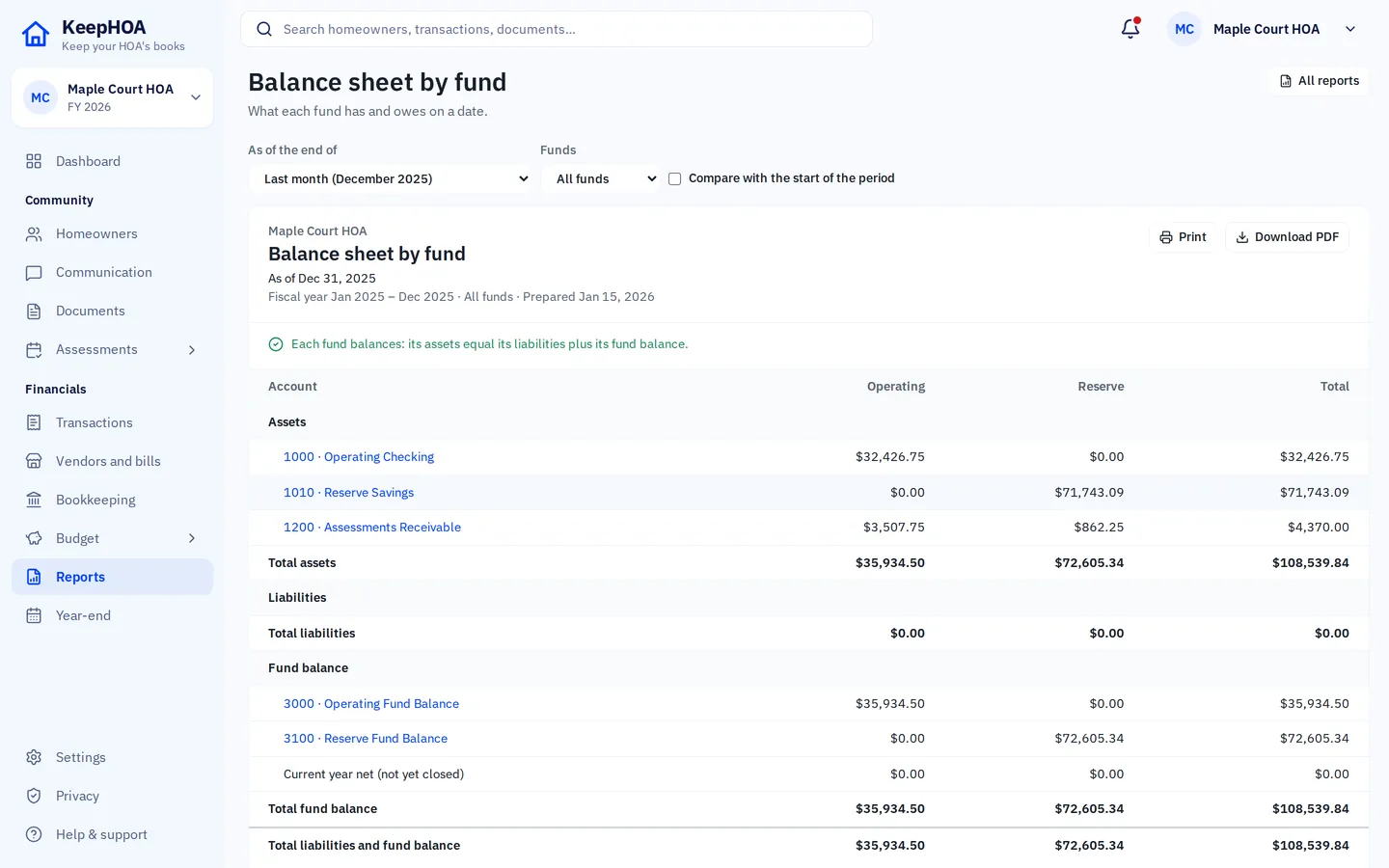
- Funds. Operating money pays for this year; reserve money is set aside for roofs, paving and pools. Owners, lenders and auditors expect to see them separately, and money moved between them is a transfer — not income, not an expense.
- Assessments receivable, by home. Dues are billed to every home. The books need to know, for each home, what was charged, what was paid and what’s still owed — and keep that history across fiscal years, because arrears don’t reset on January 1.
- A board that reads the numbers. Volunteers who aren’t accountants approve budgets and spending. Reports have to be clear, consistent month to month, and easy to check.
KeepHOA is double-entry accounting underneath, with those three things built in. You record payments and expenses in plain words; the debits and credits are kept for you.
The reports your board and accountant ask for
Every report comes straight from the books, for any period, and prints or downloads as a PDF:
- Balance sheet by fund — what each fund has and owes.
- Income statement — income and expenses for the period and the year to date, per fund.
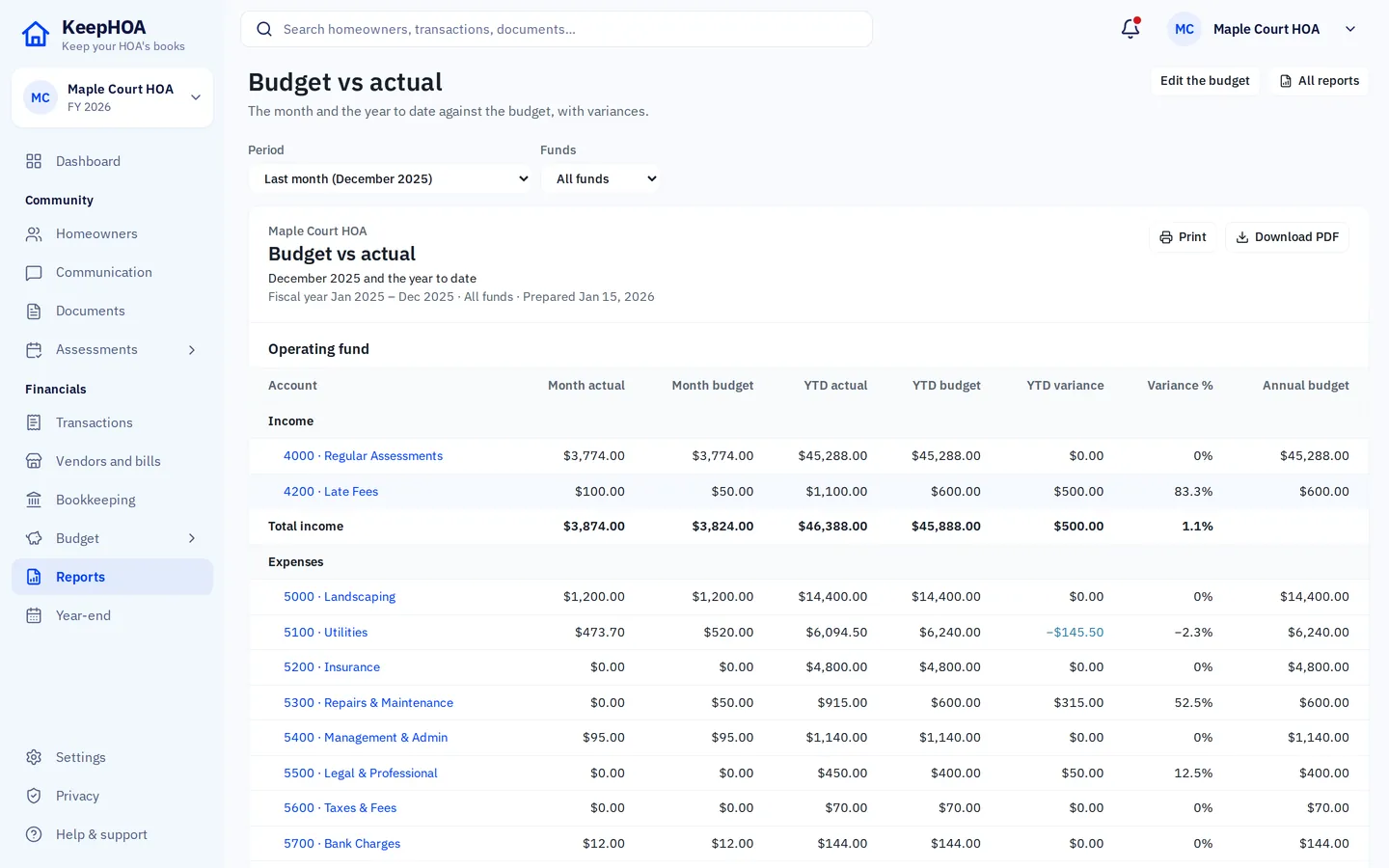
- Budget vs actual — every line against the budget the board approved, with the variance.
- Cash position — each bank account’s balance and when it was last reconciled.
- Receivables aging — what each home owes and for how long.
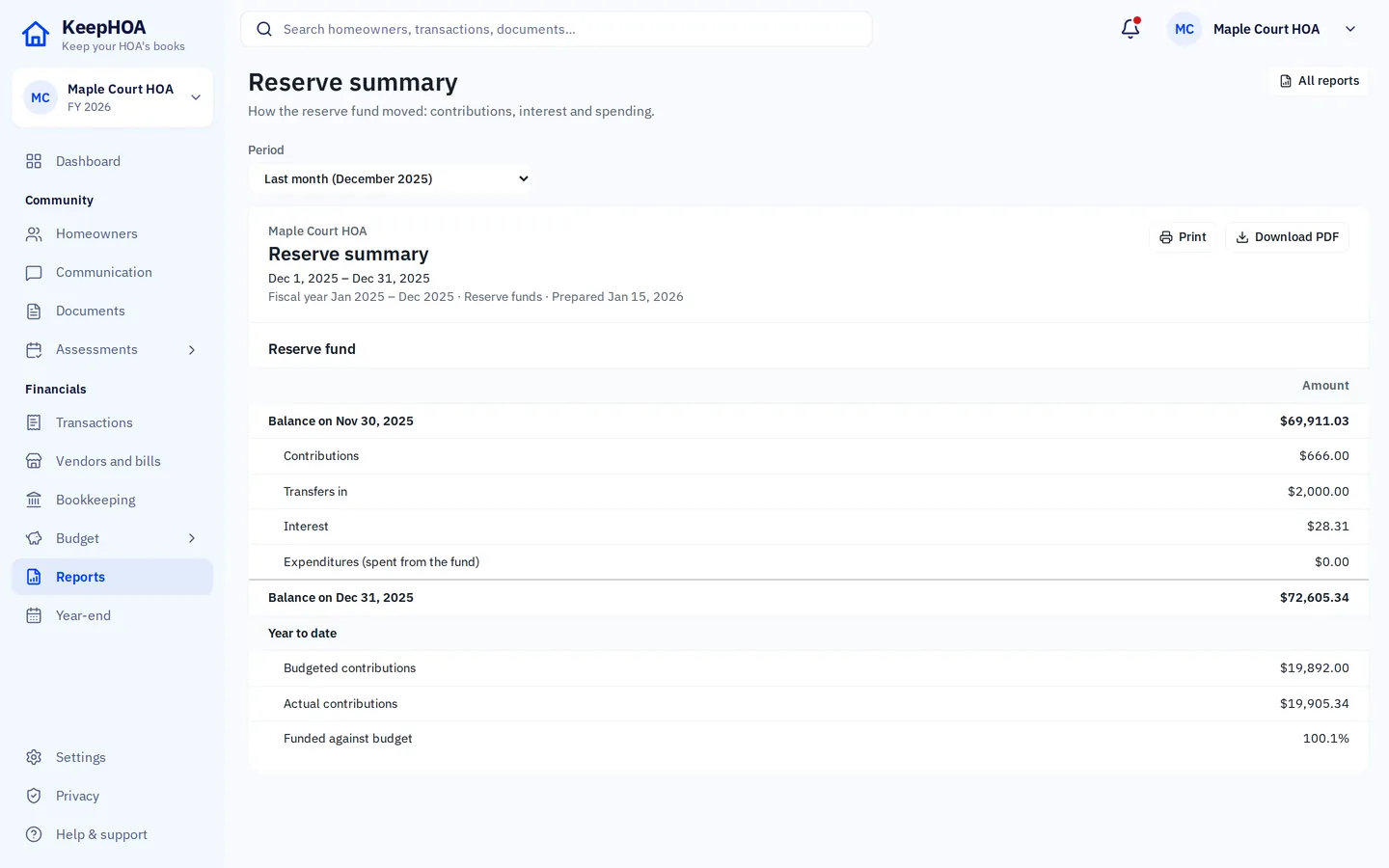
- Reserve summary — contributions, transfers, interest and spending from the reserve.
- Trial balance and general ledger — for the accountant.
The board packet puts the ones you choose into a single PDF with a note from the treasurer, ready to send before the meeting.
Reserve funds, kept apart
Reserve cash usually sits in its own savings account. In KeepHOA the reserve fund has its own balance, its own share of each assessment if you split dues between funds, and its own report. Moving money from operating to reserve is recorded as a transfer, so the operating fund doesn’t look like it spent money it only set aside.
Year-end without the scramble
Close each month once it’s reconciled; a closed month can’t be changed by accident, and a copy of the books as of that close is kept for good in your Google Drive’s version history. At year-end, closing the year carries every balance forward and starts income and spending from zero. The accountant gets the trial balance, general ledger, chart of accounts and each home’s balance as CSV files.
Books you can trust later
Posted entries can’t be quietly edited or deleted. A mistake is voided and re-entered, so there’s always a trail — and every change is recorded with the name of the Google account that made it. A completed bank reconciliation is locked. When a treasurer hands over, the next one inherits books that explain themselves.
General information, not accounting, legal or tax advice. Filing and audit requirements for associations vary by state and by governing documents; your accountant can tell you what yours are.
Is KeepHOA right for your HOA?
A good fit if…
- Your HOA is self-managed, with a volunteer treasurer.
- You want operating and reserve kept apart without building it yourself in general accounting software.
- The board wants clear monthly reports and the accountant wants clean year-end files.
- You’d rather pay once than subscribe, and keep the books in the HOA’s own Google Drive.
Probably not the right tool if…
- You need homeowners to pay online through the software. KeepHOA records payments and puts your own payment link or QR code on statements, but doesn’t process payments.
- You’re a management company running many associations with staff logins and client billing.
- You need an owner portal, violations tracking or a community website today.
- You need live bank feeds. KeepHOA imports the bank’s CSV, OFX or QFX download instead.
Questions
Does KeepHOA use fund accounting?
Yes. Every entry is recorded against an account and a fund — operating or reserve — so each fund has its own balance sheet and income statement, and money moved to the reserve is a transfer, not an expense.
Is it cash or accrual accounting?
Assessments are recorded when they’re billed, so each home’s balance is always what it truly owes, and it carries from one year to the next. Payments are applied to the oldest charge first; anything extra is held as a credit.
Will our accountant be able to use it?
At year-end KeepHOA exports the trial balance, general ledger, chart of accounts and home balances as CSV files, which an accountant can bring into their own software. KeepHOA does not prepare tax returns.
Does it do reserve studies?
No. KeepHOA keeps the reserve fund’s money apart and reports it (contributions, interest, spending, balance), and the budget includes the reserve. The study itself — what will need replacing and when — comes from a reserve study provider.
What does it cost?
$149 once for your association, for the whole board. There’s a 30-day free trial with no credit card, and a 30-day refund if it isn’t right.
See your HOA’s funds side by side
Try everything free for 30 days, no credit card. Then $149 once for your whole board.