
Last updated
Small HOA accounting software, sized for one volunteer
Stop running a small HOA’s books on a spreadsheet.
A small association needs dues by home, a bank that matches the books and a report the board can read. KeepHOA does that for $149 a year, which for 24 homes is $6.21 a home a year.
Import it in minutes, or I’ll do it for you (first 25 HOAs). Your files never touch our servers.
- Same price at any size
- No per-home fees
- Yours if you stop renewing
Under 50 homes
What matters when you have fewer than 50 homes
Cost against a small budget
A small HOA’s whole annual budget may be a few tens of thousands of dollars. Software that costs a few hundred dollars every year is a real line in it.
Learnable in an evening
The treasurer is a volunteer who may do this for two years. They shouldn’t need a course.
Per-home balances that carry over
Even with 15 homes, someone is always a quarter behind. The books should know exactly who owes what, from which period.
A report the board can read
One page: cash, budget vs actual, who owes, the reserve.
A handoff that works
When the treasurer changes, the next one should open the same books, not inherit a folder of spreadsheets.
KeepHOA
All five, for $149 a year
The same price for every size of association, for the whole board.
Start free: bring your spreadsheetDo the math
The cost, per home
- 10 homes$14.90a year, per home
- 24 homes$6.21a year, per home
- 40 homes$3.73a year, per home
- 50 homes$2.98a year, per home
There are no per-home, per-user or per-month charges, and board members who only view the books never need anything.
An honest answer
Is a spreadsheet still enough?
A careful spreadsheet can do the job if your HOA has…
- annual dues,
- a handful of expenses a year,
- no reserve account,
- and one person who’s happy keeping it.
You’ve outgrown it when…
- you’re tracking who owes for more than one period, or anyone pays in parts;
- you keep a reserve fund and need its balance separate;
- the spreadsheet and the bank statement don’t agree, and finding out why takes an evening;
- the board asks for a budget vs actual and you build it by hand;
- you’re about to hand the books to someone else.
Nothing to ignore
What a small HOA can skip
Platforms built for management companies carry things a small self-managed HOA rarely needs: staff logins, work orders, client billing, websites.
KeepHOA doesn’t have those either. It’s self-managed HOA software for the one job a small board can’t skip: the books, done properly, and nothing you have to pay for and ignore.
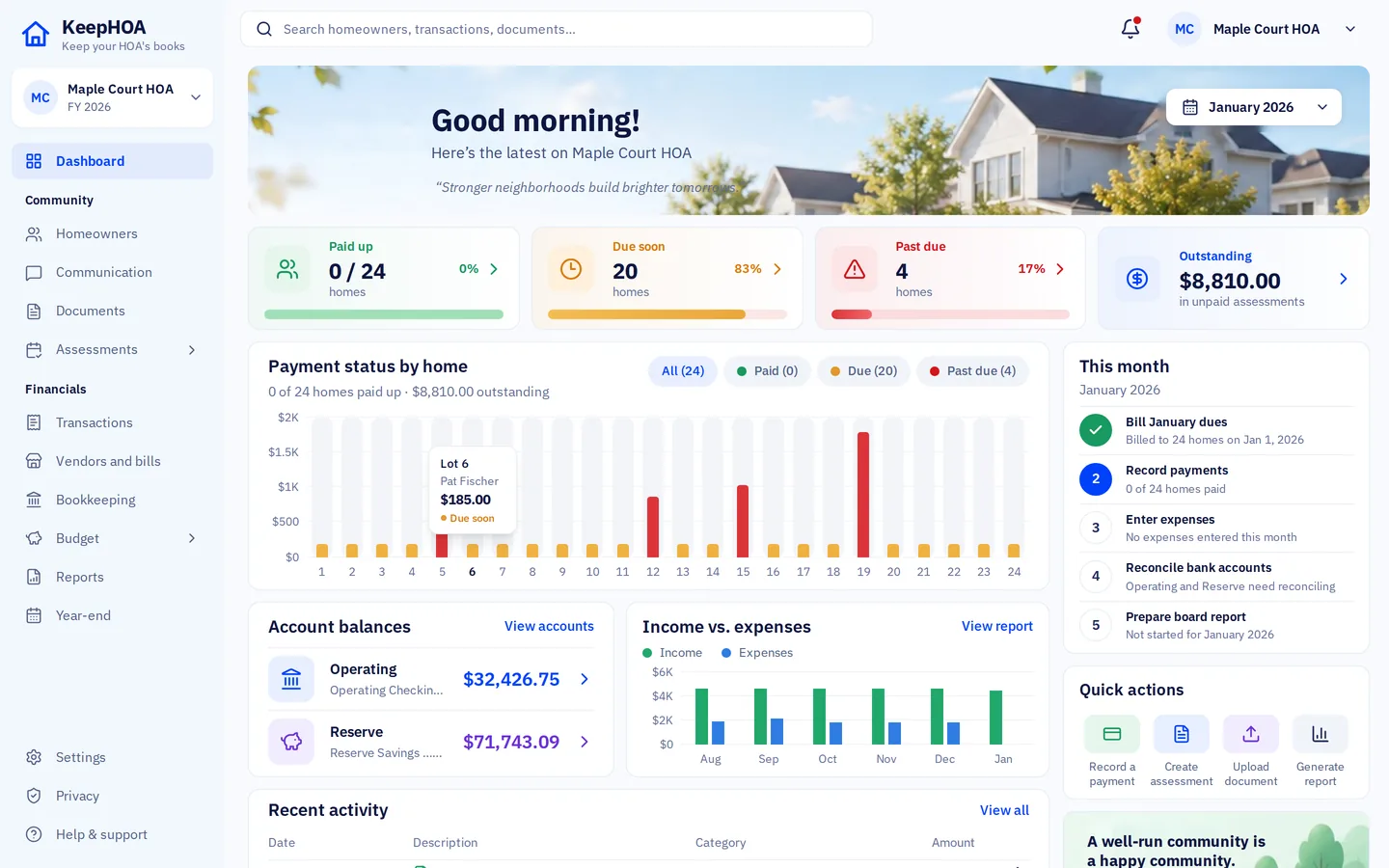
How it works
Tonight, not next quarter.
- 1
Create your books
Name your HOA and choose where the books live: your HOA’s Google Drive (to share with the board) or this computer only.
- 2
Paste your homes
The setup wizard takes your homes and owners from a spreadsheet, your funds, bank accounts, dues and opening balances.
- 3
Run the month
Bill dues, record payments and expenses, import the bank file, reconcile, and print the board packet.
Why not a spreadsheet, or general accounting software?
Both can work. Neither is built around the three things that make HOA books their own kind of problem: funds, a balance for every home, and a board that reads the numbers.
| What you need | KeepHOA | Spreadsheet | General accounting software |
|---|---|---|---|
| Built around an HOA’s books | YesFunds, homes and the board | NoWhatever you build | PartlyCan be bent into shape |
| Operating and reserve funds kept apart | YesBuilt in | PartlyBy hand | PartlySet up by hand, with class tracking |
| Balance per home, carried across years | YesBuilt in | PartlyBy hand | PartlySet up and kept up by hand |
| Who can work in the books | YesUnlimited board members | PartlyEmail attachments | PartlyOne plan seat per person |
| Price | $149 a year | Free, plus your evenings | A monthly plan |
Is KeepHOA right for your HOA?
We’d rather you choose the right tool than the wrong one.
A good fit if…
- You have roughly 10 to 50 homes and a volunteer treasurer.
- Dues are monthly, quarterly or yearly, paid by check, Zelle or transfer.
- You keep, or want to start, a reserve fund.
- You want the books to outlast the current treasurer.
Probably not the right tool if…
- Your HOA has annual dues and almost no activity: a spreadsheet may genuinely be enough.
- You want homeowners to pay online inside the software.
- You need a community website or homeowner accounts in the same product.
One price for the whole board. $149 a year.
No per-home, per-user or per-seat charges. Try everything free for 30 days first, no credit card.
- 30-day free trial. Every feature, with the sample HOA or your own books. No credit card.
- Never held hostage. Stop renewing and you can still view, print and export everything. Only recording new entries locks.
- Your books, your Drive. They live in your HOA’s own Google Drive, not on our servers.
KeepHOA for one HOA
$149a year
Locked for as long as you stay.
First 100 associations, then $199 a year.
Autopilot is an optional $49 a year add-on. The first year is included with a founding licence.
- Every feature, from dues to year-end close
- Unlimited board members, editors and viewers
- Updates included
- Books in your HOA’s Google Drive, or on this computer
- Handoff file with every receipt and the full history
- Email support from a real person
Import it in minutes, or I’ll do it for you (first 25 HOAs). Your files never touch our servers.
Reconcile your first month and produce a board packet within 30 days, or I refund every dollar. Your books stay in your own Google Drive either way.
Straight answers.
Something else? Email support@keephoa.com. A person answers.
Is KeepHOA too much for a 12-home HOA?
Not usually. You only use what you need: bill dues, record payments, reconcile, print a report. Everything else stays out of the way. If your dues are annual and you have a handful of expenses a year, a careful spreadsheet may still be enough (see the section above).
Can we bill dues quarterly or once a year?
Yes. Dues schedules can be monthly, quarterly, twice a year or yearly, and special assessments can be billed on their own.
Can one person do all of it?
Yes. Most small HOAs have one treasurer doing everything. Share the books with another board member as “Can view” so someone else can always see the numbers.
Do we need Google Drive?
No, you can keep the books on one computer. But for a small HOA, Drive is what keeps the books from disappearing when the treasurer moves or steps down, and it lets the board open them.
What does it cost for a small HOA?
The same for every size: $149 a year for your association, for the whole board, after a 30-day free trial. Reconcile your first month and produce a board packet within 30 days, or I refund every dollar. Your books stay in your own Google Drive either way.

Built for the HOA with one treasurer
Try everything free for 30 days, no credit card. Then $149 a year, locked for as long as you stay.
Import it in minutes, or I’ll do it for you (first 25 HOAs). Your files never touch our servers.